Overview
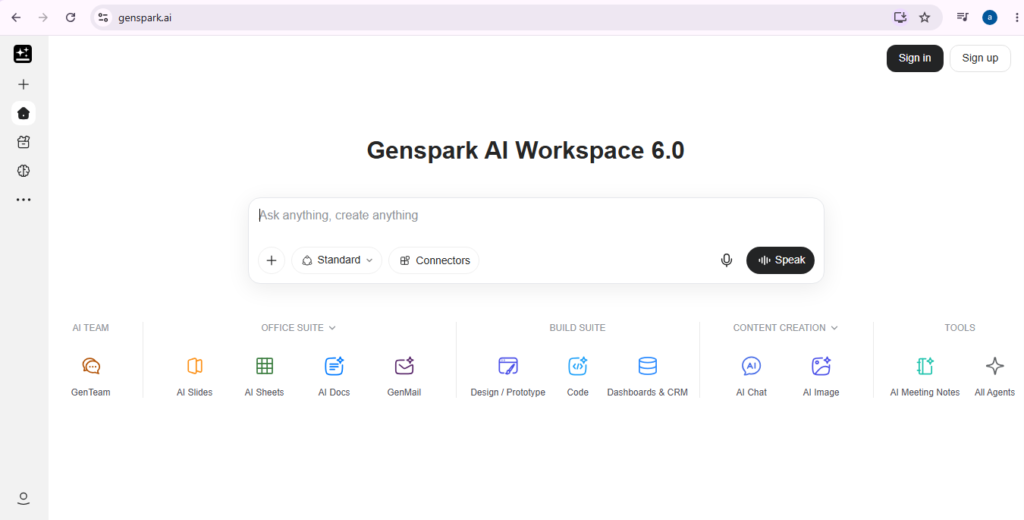
Genspark is an all-in-one AI workspace that brings multiple AI models, agents, productivity tools, and content-creation features into a single platform. Its current workspace includes tools for AI chat, presentations, spreadsheets, documents, coding, images, video, audio, design, and autonomous tasks.
During my hands-on review, I explored Genspark as more than a standard chatbot. I looked at how the workspace combines models from different AI providers and examined features including Genspark Claw, Docs-related workflows, productivity automation, and Speakly. I also reviewed how Claw can connect with services such as WhatsApp, Slack, and Microsoft Teams and operate either through a cloud computer or locally on a desktop. Genspark’s current documentation confirms these channel connections and local/cloud deployment options.
Another part of my test focused on the broader productivity workflow. I explored how Genspark can support document creation and repetitive work rather than requiring a separate AI tool for each task. The platform currently provides AI Slides, AI Sheets, AI Docs and reusable workflows; its automation system can work with services including Gmail, Outlook, Google Drive, Slack and Microsoft Teams.
Speakly also stood out during the review as a voice-based productivity component. It turns speech into polished text and can be used across applications rather than being limited to a single chat window. Genspark currently supports Speakly on Mac, Windows, iPhone and Android, with voice-to-text, AI cleanup and multilingual capabilities.
Overall, Genspark looks most useful for people who want research, writing, office work, AI agents and automation inside one ecosystem. Because the supplied test notes do not document a specific benchmark, generation time, or side-by-side output-quality test, I would not make claims about its speed or accuracy based on this review alone.
Pricing & Plans
Genspark uses a freemium model with Free, Plus and Pro memberships. The official Help Center confirms a Free tier, although it does not give one universal free-plan credit allowance on its membership overview. A separate official AI Chat page currently states that free users receive 100 daily credits. Plus currently costs $24.99/month and starts with 10,000 credits per month. Annual billing costs $239.99/year, equivalent to about $19.99 per month. It includes 50 GB of AI Drive storage and access to the wider workspace. Pro costs $249.99/month, or $2,399.99/year, and starts with 125,000 monthly credits plus 1 TB of storage. Genspark says the listed membership benefits are guaranteed through December 31, 2026.
Key Features
- Multi-Model AI Workspace
Brings AI chat, research, documents, presentations, spreadsheets, coding and media-generation tools into one workspace.
- Genspark Claw
AI assistant that can work through messaging channels and connected services; I examined this capability during my review.
- Workflow Automation
Creates reusable automations involving email, files, messaging, calendars and supported third-party services.
- AI Office Tools
Provides dedicated tools for Slides, Sheets and Docs, reducing the need to move between separate AI workspaces.
- Speakly
Converts natural speech into cleaned-up text and supports voice-driven productivity across desktop and mobile applications.
- Media & Coding Tools
Officially provides access to image, video, audio and coding capabilities alongside its productivity agents.
Popular Use Cases
- Research & Knowledge Work
Gather information, organize findings and turn research into usable documents or other project outputs.
- Presentation Creation
Generate a presentation from a topic, instructions or uploaded source material and refine it inside the Slides workspace.
- Spreadsheet Analysis
Import spreadsheet or document data, ask questions conversationally, create calculations and visualize results.
- Inbox & Task Automation
Build workflows that interact with email, cloud files, calendars and collaboration platforms.
- Voice-Assisted Writing
Dictate emails, notes and other text while Speakly cleans up speech and formatting automatically.
- Cross-App AI Assistance
Use Claw to carry out supported tasks through messaging services and connected business applications.
Best For
- Knowledge workers
- Content creators
- Freelancers
- Marketing and operations teams
- AI power users
What to Verify Before Choosing
- Current credit consumption for the specific agents you intend to use.
- Whether Plus or Pro benefits change after December 31, 2026.
- Separate Genspark Claw Cloud Computer pricing if you need 24/7 cloud operation.
- Availability and credit requirements of individual image, video and audio models.
- Privacy permissions before connecting email, messaging, cloud storage or local files.
- Current cancellation and refund terms before starting a paid subscription.
Frequently Asked Questions
What is Genspark?
Genspark is an all-in-one AI workspace combining AI models, research, documents, presentations, spreadsheets, coding, media generation, agents and automation tools.
Is Genspark free?
Yes. Genspark officially offers a Free membership, while an official AI Chat page currently states that free users receive 100 daily credits.
How much does Genspark cost?
Plus currently starts at $24.99 per month with 10,000 credits, while Pro starts at $249.99 per month with 125,000 credits.
What did I test in Genspark?
I explored its multi-model workspace, Claw assistant, document-related productivity capabilities, workflow automation and Speakly functionality during my hands-on review.
Who is Genspark best for?
It is most relevant to professionals and creators wanting research, office productivity, automation, AI agents and multiple generative AI capabilities in one workspace.